NOW ON APP STORE

Scan receipts.
Track every expense.

The most powerful offline expense tracker for iPhone. Snap a receipt photo, auto-extract details with AI, and never lose a receipt again.

Receeto expense tracker app showing dashboard with spending chart and recent transactions

Everything you need
to manage expenses.

Built natively in Swift for blazing-fast performance. Every feature works offline, on-device. Free to start with flexible upgrade options.

AI Receipt Scanner

Snap a photo and on-device AI extracts merchant, amount, date, and category instantly. Powered by Apple Vision OCR and Foundation Models for accurate receipt scanning.

Receeto AI receipt scanner extracting merchant name, total amount, and date from a scanned receipt

Smart Categories

14 categories with automatic mapping. Every expense is sorted from coffee to travel, groceries to entertainment. AI learns your spending patterns.

Receeto smart expense categories showing food, transport, shopping, and entertainment with emoji icons

Multi-Currency Support

27 currencies with auto-detection from receipts and real-time conversion rates. Travel internationally without worrying about manual currency conversion.

Receeto multi-currency expense tracking showing USD, EUR, GBP, and INR conversion

Spending Analytics

Visual spending charts, category breakdowns, and merchant trends at a glance. Your go-to money tracker to know exactly where your money goes with daily expense breakdowns, weekly averages, and monthly insights.

Receeto spending analytics dashboard with monthly trend chart and category breakdown

Get started in 3 simple steps.

From download to your first scanned receipt in under a minute. No account, no sign-up, no setup.

1

Download Receeto

Free to download on the App Store. No account or sign-up needed. Open the app and start tracking immediately.

Download Receeto from the App Store
2

Scan Your First Receipt

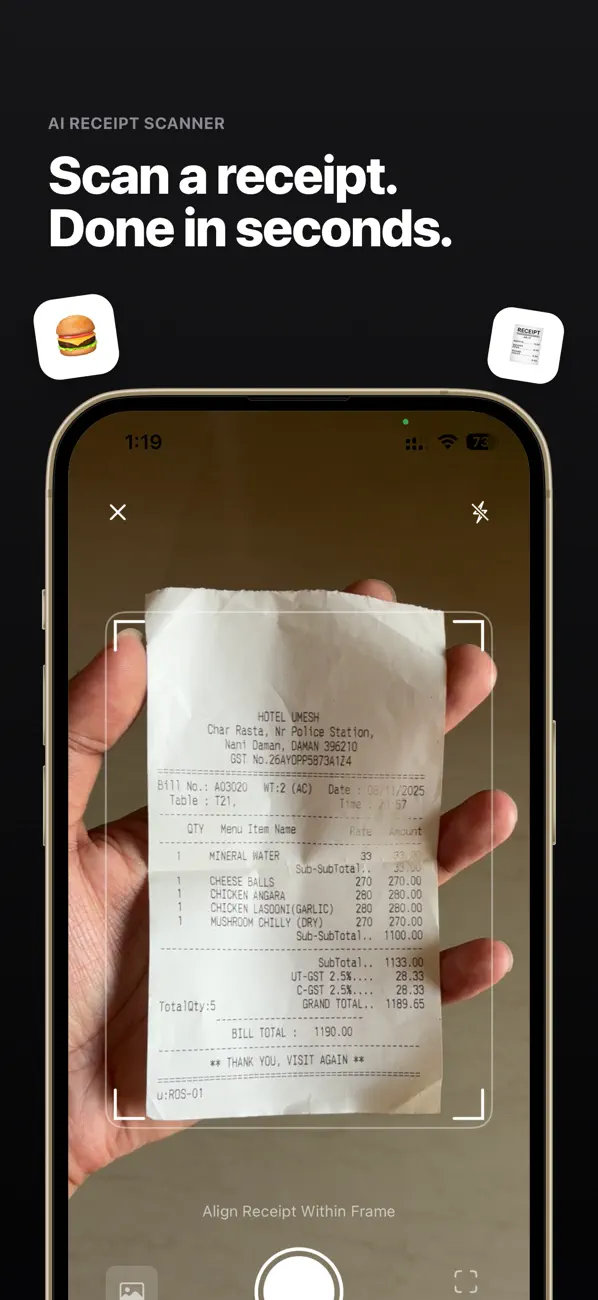
Point your receipt camera at any receipt. Receeto works as your personal expense logger — AI extracts all the details automatically with on-device OCR processing.

Scanning a receipt with Receeto camera showing viewfinder and auto-detection
3

Review & Confirm

Merchant, amount, and category are auto-extracted. Review the details, make any edits, and save.

Receeto expense detail screen showing extracted merchant, amount, and category

Start tracking expenses today.

Free to start. 100% offline. No account needed.

Download Receeto on the App Store

Why Receeto?

Most expense trackers require cloud accounts, subscriptions, and send your financial data to servers. Receeto is different.

100% Offline & Private

The most private expense tracker on the App Store. Your receipts, expenses, and financial data never leave your device. No cloud servers, no data collection, no tracking.

Flexible Pricing

Start free for casual use. Upgrade to the Supporter plan ($9/year) or go all-in with the Believer plan ($29 one-time). No hidden fees, no surprises.

Native iOS Performance

Built with SwiftUI and Apple's on-device AI frameworks. Receipt scanning, expense tracking, and analytics all run at native speed with no lag.

Simple, transparent pricing.

Start free with no account required. Upgrade anytime to unlock premium features. No hidden fees, no surprises.

Free

$0

For casual use

  • 5 receipt scans per day
  • Unlimited manual entries
  • 14 auto-categories
  • Future updates included
  • 100% offline & private
Get Started

Supporter

$9/yr

$0.75/month. Cancel anytime.

  • Unlimited receipt scans
  • CSV & ZIP data export
  • Unlimited manual entries
  • All future updates included
  • 100% offline & private
Get Supporter

What our users are saying

Here's what our users have to say about tracking expenses with Receeto.

Ankur Khandelwal

"I used to throw receipts in a drawer. Now I just snap a photo and everything is tracked automatically. Game changer."

Ankur Khandelwal

Freelance Developer

Jatin Mukheja

"The AI extraction is shockingly accurate. It gets the merchant, amount, and even categorizes it correctly every time."

Jatin Mukheja

Small Business Owner

Karan Rathod

"Love that it works completely offline. My receipt data stays on my phone and I don't need yet another account."

Karan Rathod

Software Engineer

Dipali R

"The spending analytics finally showed me where my money actually goes. The category breakdown is incredibly useful."

Dipali R

Finance Student

Ankur Khandelwal

"I used to throw receipts in a drawer. Now I just snap a photo and everything is tracked automatically. Game changer."

Ankur Khandelwal

Freelance Developer

Jatin Mukheja

"The AI extraction is shockingly accurate. It gets the merchant, amount, and even categorizes it correctly every time."

Jatin Mukheja

Small Business Owner

Karan Rathod

"Love that it works completely offline. My receipt data stays on my phone and I don't need yet another account."

Karan Rathod

Software Engineer

Dipali R

"The spending analytics finally showed me where my money actually goes. The category breakdown is incredibly useful."

Dipali R

Finance Student

Frequently Asked Questions

Everything you need to know about Receeto.

Does Receeto work offline?
Yes, Receeto works 100% offline. All receipt scanning, data extraction, and expense tracking happens entirely on your device using Apple's on-device AI frameworks. No internet connection is needed for any feature.
Is Receeto free?
Receeto offers a Free plan that lets you scan receipts and track expenses with no account required. For power users, the Supporter plan ($9/year) and Believer plan ($29 one-time) unlock unlimited scans and data export. You can upgrade anytime from within the app — no hidden fees or surprises.
Does Receeto collect my data?
No. Receeto collects zero data. Your receipts, expenses, and financial information never leave your device. There are no servers, no accounts, and no tracking of any kind. Your privacy is absolute.
How accurate is the receipt scanner?
Receeto uses Apple's Vision framework for OCR and on-device Foundation Models for intelligent extraction. It accurately reads merchant names, totals, dates, and auto-categorizes expenses across 14 categories. The more you use it, the better it learns your spending patterns.
What currencies does Receeto support?
Receeto supports 27 currencies including USD, EUR, GBP, JPY, CAD, AUD, INR, KRW, BRL, and more. It auto-detects the currency from scanned receipts and can convert between currencies using regularly updated exchange rates.
Can I export my expense data?
Yes. Receeto lets you export your expenses as CSV files or ZIP archives that include both the CSV data and your receipt images. Share via email, AirDrop, or any sharing app on your device.
What happens if I delete the app?
Since all data is stored locally on your device, deleting the app will permanently remove all your expense data and receipt images. We recommend exporting your data before uninstalling. If you use iCloud device backups, your data may be included in those backups.
Which iPhone models are supported?
iPhone 15 Pro models, and iPhone 16 models or later. iPad mini (A17 Pro), and iPad models with M1 and later. iOS 18.1 or later / iPadOS 18.1 or later.

Ready to take control of your expenses?

Download Receeto free. No account, no cloud, no subscription required.

Download Receeto on the App Store
A note from the maker

Why I built Receeto

Hey — I'm Mohit. I built Receeto out of frustration. Every expense tracker I tried wanted my email, pushed me to a subscription, and shipped my financial data off to some server. It felt wrong.

As a design engineer, I knew it was possible to build something better — an AI receipt scanner that runs entirely on your device. No cloud. No account. No monthly fee. Just point your camera at a receipt and it's done.

Receeto is for people like me: anyone who wants a dead-simple way to track spending without handing over their privacy. I hope you find it useful.

Mohit Gaddam
Mohit Gaddam
Design Engineer, Mumbai